Filter Content through Yahoo pipes
Sunday, February 11, 2007

Create your own wonder web with everything you want using Yahoo pipes!
Today in the time of RSS, which already delivers all the content from different providers in your Feed Aggregator, Yahoo recently launched a new service Yahoo! pipes a hosted visual environment tool which will provide you to mashup all your feeds to create new applications using drag+drop and virtually connect pipes to create modules.
According to Yahoo!-
What Is Pipes? Pipes is a hosted service that lets you remix feeds and create new data mashups in a visual programming environment. The name of the service pays tribute to Unix pipes, which let programmers do astonishingly clever things by making it easy to chain simple utilities together on the command line.
 What can Pipes filter?
Yahoo is trying to give developers and its not so tech-savvy users more power in combining structured data feeds, typically done through the RSS or Atom protocols. The service which is still in beta stage currently works only with RSS and Atom feeds, Yahoo intends to expand the number of data sources with which people can work. It also plans to give programmatic access to the Pipes engine, support for additional data sources (such as KML), more built-in processing modules, the ability to extend Pipes with external, user-contributed modules and last but not the least more ways to render output (Badges, Maps, etc...). Pipes can take any feed as input, and combined with the already available list of functions proves to be very powerful.
How to Use Yahoo! Pipes
Firstly you need to have an account with Yahoo to use this service, which may sound pretty obvious to you. I would personally suggest you to go through other created pipes and get an idea of how they are put together. You easy to make your own pipes public, to clone pipes that others have made and use them as your own template, or to offer your own for others to clone.
You can read O’Reilly’s Yahoo! Pipes: The Modules For Building Pipes for an insight on how moduling can be done.
Will it Be successful?
The ingredients of online success in Web2.0 depends upon the accessibility, usability and the social advancements it can provide its users, along with the uniqueness of the Idea behind it. With all the above Yahoo has already defined Pipes to be one of its kind, a fresh cool blue look, user friendly interface, innovative and well-organized.
What are you waiting for, Go ahead and create your own mashup.
Till then,
Happy Blogging,
Divya Uttam
Bookmark this article:-


Technorati Tags:- Yahoo Pipes, Web Usability
Labels: Tech Fame

An Ajax talk over an Espresso
Thursday, February 08, 2007
 Prepare your coffee, steamy hot, to enjoy this little chat about Ajax.
Ajax is a new mix of technologies to save time, make your website more interactive, responsive and easy to use. The web will recover from wasting time on annoying reloading web-pages with the use of Ajax. Your users wont have to wait when JavaScript makes request to the web servers. You can still type in forms, click buttons or links while web server is working in the background. Then when the servers are done the part of the page is updated where changes are needed. But you are never waiting around.
What is Ajax?
Jesse James Garrett coined the term Ajax. Ajax stands for Asynchronous JavaScript and Xml, but it is not an acronym for the same. Ajax is a way to communicate with the server without refreshing the whole page. Till now web applications have been a walkie talkie system. Once you have done the talking(fill a web form), say over(send request), you’ll get response from the server and your page is reloaded. Ajax had put an end to this. Though web still depends upon request response method, but here JavaScript code in Ajax sends a request to the server and while it works to send back a respond, you don’t have to wait to get it reloaded. You can still work on the other parts of the page. With a bit of knowledge about HTML, CSS and JavaScript it would be very easy to work with it. According to Garrett:-
“Ajax isn’t a technology. It’s really several technologies, each flourishing in its own right, coming together in powerful new ways. Ajax incorporates:
- standards-based presentation using XHTML and CSS;
- dynamic display and interaction using the Document Object Model;
- data interchange and manipulation using XML and XSLT;
- asynchronous data retrieval using XMLHttpRequest;
- and JavaScript binding everything together.
This article is a must read.
How can Ajax help?
1. Clicking on archieves or calendar, changes the post content of your blog.
2. HTML is produced locally so you can save your band width on those heavy traffic days.
3. Improves user interface.
4. It has ability to deliver cross platform, cross browser and desktop quality applications.
5. Can provide Drag and drop feature.
6. Reduces coding that would be needed for the same web application to make it as interactive.
A few good Ajax examples…
1. The biggest and most premium example of Ajax Users is Google. Orkut, Gmail, Google Maps, Google groups are all Ajax applications.
2. Go2Web2.0 have changed their user interface and added Ajax components to their site. Clicking on a logo will not move any part of the page except the bottom where its description is displayed changes, and till it is loading you can still look for other logos.
3. Ajaxpress is a brand new Ajax based blogging system built on PHP and Javascript and a MySQL backend. It may look a little limited because this is its first version updated. It would be interesting to follow up this one.
4. Writely- A web word processor and highly specialized application with a range of fonts, spell checker and embedded pictures, etc.
5. Kiko- Online calendar solution based on Ajax, easy to use, drag and drop, manage groups and content, create tags for your appointments uses cool pastels which are pretty soothing.
Ajax is one of the most happening technologies today and is here to stay. I hope you enjoyed your coffee.
Till next time,
Happy Blogging,
Divya Uttam.
Bookmark this article:-
Technorati Tags:- Web Usability,Ajax
Labels: Tech Fame, Web Usability
Why not to mistake Technorati's WTF as Digg clone?
Sunday, February 04, 2007

Where’s The Fire more adorably known as WTF, is a social media feature, recently launched by Technorati, will help you write about the hottest and on fire topics, discuss them and vote for them. It allows users to write explanations of topics or search terms that are floating around the blogosphere. The Technorati community can then vote on the best submissions, which will then appear alongside search results and the top searches list.
According to David Sifry:
When you see a top search with an orange flame next to it, it means at least one person from the community has written their view as to why that topic is hot - right now. The community is also invited to either write their own explanation or vote on the WTFs they view as most helpful. Based on a combination of number of votes and timeliness, the top WTFs by search topic appear on the top of the results page.
But it isn't just for the hottest searches or the stuff with the biggest buzz - in fact, one of the things that I like the most about WTF is that you can write an explanation about any search or topic, and if you get the most votes, your explanation goes in at the top of the results page for that search. You can write a WTF on any topic that someone would search for, and provide information and resources to them about that topic or subject. So, you might want to write a WTF about yourself or your friends names, or your company (or maybe even your competition!)
Get rest of the article here.
Where’s The Fire is not Digg?
Since WTF is launched many had compared it with Digg and called it Digg’s clone. As Google has become a synonym for search engine, Digg has become a synonym for Social Media site. That is why any voting feature has to be compared to Digg whether they are related or not. My point is that Technorati has just the voting part for the blurbs common with Digg. Where stories become hot in Digg it’s the keywords and most popular searches that form a part of Technorati’s new WTF.
This feature allows users to explain most talked about issues and searches. Users can pick up any topic and write an explanation to it, why is it popular or anything they feel like. The stories do not directly link to any other blog or site, till a link is not deliberately inserted. Quality will be of prime focus here, not just the hotness of a topic.
How will The Fire help you?
1. The framework that is introduced by Technorati will give bloggers the power to raise their voices to be heard and give them a position in Blog Searches.
2. Will give your blog, popularity it deserves because it has quality content and not because of its distribution status..
3. Will give your opinions more exposure and you can talk about topics of your interest or which are relevant to your Blog.
4. Provides you as a Technorati Community, the power to vote for what is important and relevant to you, giving it a social media flavor.
Where’s the Fire, is going to the latest buzz on the blogosphere, and is there to stay. So all of you add WTF to your list of social media sites. Where WTF will give importance to the quality content but will also help you create your brand. Now when there is a awesome increase in the facility the Social Media offers you and with the all the latest developments, the Blogosphere will be like ever expanding universe and every company whether large scale or small, will be a part of it, along with individual bloggers.
So keep up with it,
Happy Blogging,
Divya Uttam.
Bookmark this article:-
Technorati Tags:- Blogging Trend,WTF,Technorati,Where's The Fire
Labels: Blogging Trend, Tech Fame
Vital Lessons Before you use Flash this year
Thursday, January 25, 2007
We are in a amazing period of time to witness the major developments in Internet. As we get accustomed to the more advanced web, with faster Internet connections, search engines with more indexing capabilities and from evolvement of social media, it’s an experience to see many projects coming from alpha stage to beta.
With all this going on, it’s always an issue to watch the role Flash plays here. Flash can much obviously make your site attractive and unique. Its quite an entertaining experience for the visitors to surf flashy sites and can make your site more sticky. When we acknowledge flash based utilities we can call it creativity at its best.
Where stickiness comes, unnecessary or overuse of flash may annoy your visitor. The major issues to handle are mass approach, navigation and usability of your idea. As the neThe point to ponder is the loading time of such sites and how effectively Flash is being used.t becomes more multimedia oriented and trendier, it should become more advanced and user-friendly.
How to effectively fuse it with your site? What should Flash Do for you and your User?
1. It should add to the user experience
2. Use Flash to support your content but not the other way round
3. Enhance User Interface
4. Optimize Flash files as much as possible.
5. Should make navigation easier.
6. Use Flash wisely and in reasonable amounts.
When can flash go against your site?
1. Flash should not interfere with the information on your site.
2. Don’t make your whole site a Flash Application. If you do provide with an alternate choice of HTML version.
3. Should not slow down your sites loading time noticeably.
4. Do not use text in flash which you want to be indexed by the search engines.
5. Flash should not be your objective but a help to display content effectively.
6. Accessibility should not be hampered.
Not all browsers support Flash files effectively. If the text is included with the designing part of flash it may not be properly retrieved, hence creating a vacuum in information provided, as it is flash based websites are not able to handle large amount of text. Heavy flash usage can also weigh down your web page.
Why Use Flash?
Flash is the best way to fill content gap and making your site presentable. It is a visually compelling tool that you can use to attract your visitors with. You can use flash creatively to appeal to the theme of your website. If you are running a site where flash is the actual content(like Gaming sites, jokes, maps and graphs) it is as useful.
Lets look at the following case studies:-
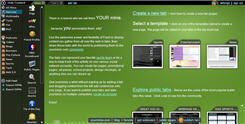 yourminis- Launched, on Nov 6, another Flash application which enables you to create your homepage, with standard widgets including videos from YouTube, photos from Flickr, weather from the Weather Channel and the latest headlines from Digg, and your own gmail account. You can customize the page without creating an account, with all your settings being stored in a browser cookie. Add RSS feeds, download videos, display your content forming tabs and can even share it with everyone else. Easy to navigate and a perfect example of usability integrated with flash.
 Msdewey- A flashed based search engine which initially pulled a lot of traffic and proved to out be a linkbait for Microsoft. It gave a humanly feel to searching on internet but sometimes Msdewey’s rumblings get on nerve if you want to search something fast. Being flash based it is a little slow to load. She will be sad, happy, angry, she may sometimes even sing to you, as a flash application it is real cool but from a search engine’s perspective it is slow, sometimes extremely slow. It does not offer any advanced feature and the results are close to cause your eyes an irritation. It would be a cool site to show your friends but not search on it. They even provided you with a mute button on its homepage, Guess they realized she can be too annoying to people.
 Swarmthe.com- The creator says-“Swarm is a useful tool for browsing the web, not searching it. You need to come here with an open mind and you may find some really cool stuff. Swarm is a graphical map of hundreds of websites, all connecting to each other. It updates itself every second with where people are going and coming from. As sites become more popular, they move towards the center of the swarm.”
You can actually watch who is surfing what, with thin lines representing traffic transfer. A look at ‘The Swarm,’ a Flash-animated mosaic where visitors can view the real-time online travels of Swarmthe.com’s volunteer surfers. Swarm got much publicity after it appeared on Digg and saw around 1000 volunteers per day. It has a database of around 8 million sites. efficiently. It is a good example of social browsing though only the more popular would be covered. As with heavy flash sites, this one takes lot of time to load, and you may come across an occasional error message.
Keep in mind it is the quality of your content and information you provide which gives you repeat visitors and not the animations and flash that is used in the site. Use Flash to boost up your sites design effectively and use it properly. Do not overdo it.
Happy Blogging,
Divya Uttam.
Bookmark this article:-
Technorati Tags:- Flash, Blog Design
With all this going on, it’s always an issue to watch the role Flash plays here. Flash can much obviously make your site attractive and unique. Its quite an entertaining experience for the visitors to surf flashy sites and can make your site more sticky. When we acknowledge flash based utilities we can call it creativity at its best.
Where stickiness comes, unnecessary or overuse of flash may annoy your visitor. The major issues to handle are mass approach, navigation and usability of your idea. As the neThe point to ponder is the loading time of such sites and how effectively Flash is being used.t becomes more multimedia oriented and trendier, it should become more advanced and user-friendly.
How to effectively fuse it with your site? What should Flash Do for you and your User?
1. It should add to the user experience
2. Use Flash to support your content but not the other way round
3. Enhance User Interface
4. Optimize Flash files as much as possible.
5. Should make navigation easier.
6. Use Flash wisely and in reasonable amounts.
When can flash go against your site?
1. Flash should not interfere with the information on your site.
2. Don’t make your whole site a Flash Application. If you do provide with an alternate choice of HTML version.
3. Should not slow down your sites loading time noticeably.
4. Do not use text in flash which you want to be indexed by the search engines.
5. Flash should not be your objective but a help to display content effectively.
6. Accessibility should not be hampered.
Not all browsers support Flash files effectively. If the text is included with the designing part of flash it may not be properly retrieved, hence creating a vacuum in information provided, as it is flash based websites are not able to handle large amount of text. Heavy flash usage can also weigh down your web page.
Why Use Flash?
Flash is the best way to fill content gap and making your site presentable. It is a visually compelling tool that you can use to attract your visitors with. You can use flash creatively to appeal to the theme of your website. If you are running a site where flash is the actual content(like Gaming sites, jokes, maps and graphs) it is as useful.
Lets look at the following case studies:-
 yourminis- Launched, on Nov 6, another Flash application which enables you to create your homepage, with standard widgets including videos from YouTube, photos from Flickr, weather from the Weather Channel and the latest headlines from Digg, and your own gmail account. You can customize the page without creating an account, with all your settings being stored in a browser cookie. Add RSS feeds, download videos, display your content forming tabs and can even share it with everyone else. Easy to navigate and a perfect example of usability integrated with flash.
 Msdewey- A flashed based search engine which initially pulled a lot of traffic and proved to out be a linkbait for Microsoft. It gave a humanly feel to searching on internet but sometimes Msdewey’s rumblings get on nerve if you want to search something fast. Being flash based it is a little slow to load. She will be sad, happy, angry, she may sometimes even sing to you, as a flash application it is real cool but from a search engine’s perspective it is slow, sometimes extremely slow. It does not offer any advanced feature and the results are close to cause your eyes an irritation. It would be a cool site to show your friends but not search on it. They even provided you with a mute button on its homepage, Guess they realized she can be too annoying to people.
 Swarmthe.com- The creator says-“Swarm is a useful tool for browsing the web, not searching it. You need to come here with an open mind and you may find some really cool stuff. Swarm is a graphical map of hundreds of websites, all connecting to each other. It updates itself every second with where people are going and coming from. As sites become more popular, they move towards the center of the swarm.”
You can actually watch who is surfing what, with thin lines representing traffic transfer. A look at ‘The Swarm,’ a Flash-animated mosaic where visitors can view the real-time online travels of Swarmthe.com’s volunteer surfers. Swarm got much publicity after it appeared on Digg and saw around 1000 volunteers per day. It has a database of around 8 million sites. efficiently. It is a good example of social browsing though only the more popular would be covered. As with heavy flash sites, this one takes lot of time to load, and you may come across an occasional error message.
Keep in mind it is the quality of your content and information you provide which gives you repeat visitors and not the animations and flash that is used in the site. Use Flash to boost up your sites design effectively and use it properly. Do not overdo it.
Happy Blogging,
Divya Uttam.
Bookmark this article:-
Technorati Tags:- Flash, Blog Design
Labels: Tech Fame, Web Usability
Ease Out With Fame Tech
Friday, January 12, 2007
These days were very tedious as Google was giving Page ranks and as expected many got their share. Oops this blog still stays in Google Sand Box, with a few internal pages getting page rank. For change and improvement I thought to add some technology posts here that would help readers to get some more fame to their blog till I wait for next Google Job. I will be getting cool technology updates under new category Fame Tech which would directly help you enhance your online presence and much more.
Here are three sites that can someday, be extremely useful, one is free, second is inexpensive and third a little hard on pocket:-
Animate the loading of your site with Ajaxload.info
 You can create those ‘loading’ animated gifs you see when you are waiting for things to load on a web page… they don’t really do anything, but they give your visitors something to look at while the page is loading …
With Ajaxload.info Either create your own or use the one already created by other users, personalize the type of indicator you want by choosing foreground and background colour or choose from the different type of indicators available. The site itself is very attractive to look at and very usable. You can have any one of these 1. 2.
2. 3.
3. 4.
4. 5.
5.  and many more, according to your Choice.
Make your Podcast Searchable with Casting Words
Though Podcasting can make your Blog popular and helps you to quickly distribute information, it won’t make you searchable. Podcasting lacks behind in one aspect and that is Search Engines cannot read them. The only ways to find podcasts is either by meta terms and other material encoded into an MP3 recording or the description provided at the podcast directories. Your Podcast can also be searched on the base of automated transcripts. AOL and PodScope use speech-to-text technology to convert podcast sound files into human readable scripts. But these are not fool proof. Speech-to-text systems still cause an unavoidable number of errors in every recording, with a condition that all podcast recordings should be clear enough for the servers to fully recognize each word.
 You can provide your own Transcripts which is the most effective way to let your listeners search your podcasts. I hope you would not plan to do it yourself while recording, because it not only is a time consuming process, but will also deviate your attention onto two things. Even after recording you should be able to keep pace with yourself to do it, if you type slower than you speak.
You can also find willing professionals to transcribe, from sites like Elance, Freelance Work Exchange and RentACoder. Many transcript services can convert podcast speech to text for about two dollars per recorded minute. Not everybody will be able to afford it.
CastingWords service offer inexpensive transcripts, starting at 42 cents per recorded minute for URL Podcast Transcription and 75 cents per minute for Uploaded file transcription. CastingWords uses a unique system to create podcast transcripts cheaply, using Amazon’s Mechanical Turk. It divides the file into smaller pieces and different independent workers of CastingWords transcript them at the same time, reducing turnaround time.
Now you can be anywhere with Adobe Ultra 2 while creating video

Now with the increasing Internet speeds and Videos capturing Internet, it is important for most Online business entrepreneurs to add Dramatic videos to their blogs or sites which get their viewers a total International appeal. The first thought that occurs at this is Lights, Camera and Location, before you know the Technology Better.
ULTRA 2 allows video producers to make powerful use of keying in the field, which can include any location you want to, your client’s office or in front of a Dinosaur. Well it will look as real as you are standing in the Jurassic Park. It is a Chroma Key Software.
Vector Keying™ Technology proves ideal when you are working with portable setups and compensates for keying nightmares, such as uneven lighting and wrinkled backdrops. ULTRA 2 can even achieve complex keys such as smoke, liquids and transparent objects with as little effort.
“[…]With Ultra 2's Master Sets Libraries, you don't need a huge green screen room to appear in large virtual environments. Ultra's Virtual Zoom feature lets you scale input video sources to match backgrounds. Full-body shots are dramatic, but it's also incredibly useful for head-and-shoulder shots and sit-down interviews where only a few feet of green backdrop are needed. Professional-looking talking head shots often contain a slow zoom in, which would be impossible to achieve with an ordinary chroma key. Ultra 2 lets you virtually zoom or pan any static camera shot in perfect sync with the keyed background.[…]"
Ultra also produces reflections where appropriate for extraordinary realism. Master Sets Libraries add high-end virtual set systems to Ultra® 2.It also helps you save thousands of dollars which you would invest in to rent specialized motion tracking cameras and 3D graphics workstations.
View Key features, Try it or Buy it. Students and Teachers can get an extra discount here.
Check out a video here.
Enjoy you date with Technology.
Till Then,
Happy Blogging,
Divya Uttam
Bookmark this article:-
Technorati Tags:- Fame Tech
Here are three sites that can someday, be extremely useful, one is free, second is inexpensive and third a little hard on pocket:-
Animate the loading of your site with Ajaxload.info
 You can create those ‘loading’ animated gifs you see when you are waiting for things to load on a web page… they don’t really do anything, but they give your visitors something to look at while the page is loading …
With Ajaxload.info Either create your own or use the one already created by other users, personalize the type of indicator you want by choosing foreground and background colour or choose from the different type of indicators available. The site itself is very attractive to look at and very usable. You can have any one of these 1.
 2.
2. 3.
3. 4.
4. 5.
5.  and many more, according to your Choice.
Make your Podcast Searchable with Casting Words
Though Podcasting can make your Blog popular and helps you to quickly distribute information, it won’t make you searchable. Podcasting lacks behind in one aspect and that is Search Engines cannot read them. The only ways to find podcasts is either by meta terms and other material encoded into an MP3 recording or the description provided at the podcast directories. Your Podcast can also be searched on the base of automated transcripts. AOL and PodScope use speech-to-text technology to convert podcast sound files into human readable scripts. But these are not fool proof. Speech-to-text systems still cause an unavoidable number of errors in every recording, with a condition that all podcast recordings should be clear enough for the servers to fully recognize each word.
 You can provide your own Transcripts which is the most effective way to let your listeners search your podcasts. I hope you would not plan to do it yourself while recording, because it not only is a time consuming process, but will also deviate your attention onto two things. Even after recording you should be able to keep pace with yourself to do it, if you type slower than you speak.
You can also find willing professionals to transcribe, from sites like Elance, Freelance Work Exchange and RentACoder. Many transcript services can convert podcast speech to text for about two dollars per recorded minute. Not everybody will be able to afford it.
CastingWords service offer inexpensive transcripts, starting at 42 cents per recorded minute for URL Podcast Transcription and 75 cents per minute for Uploaded file transcription. CastingWords uses a unique system to create podcast transcripts cheaply, using Amazon’s Mechanical Turk. It divides the file into smaller pieces and different independent workers of CastingWords transcript them at the same time, reducing turnaround time.
Now you can be anywhere with Adobe Ultra 2 while creating video

Now with the increasing Internet speeds and Videos capturing Internet, it is important for most Online business entrepreneurs to add Dramatic videos to their blogs or sites which get their viewers a total International appeal. The first thought that occurs at this is Lights, Camera and Location, before you know the Technology Better.
ULTRA 2 allows video producers to make powerful use of keying in the field, which can include any location you want to, your client’s office or in front of a Dinosaur. Well it will look as real as you are standing in the Jurassic Park. It
 is a Chroma Key Software.
Vector Keying™ Technology proves ideal when you are working with portable setups and compensates for keying nightmares, such as uneven lighting and wrinkled backdrops. ULTRA 2 can even achieve complex keys such as smoke, liquids and transparent objects with as little effort.
“[…]With Ultra 2's Master Sets Libraries, you don't need a huge green screen room to appear in large virtual environments. Ultra's Virtual Zoom feature lets you scale input video sources to match backgrounds. Full-body shots are dramatic, but it's also incredibly useful for head-and-shoulder shots and sit-down interviews where only a few feet of green backdrop are needed. Professional-looking talking head shots often contain a slow zoom in, which would be impossible to achieve with an ordinary chroma key. Ultra 2 lets you virtually zoom or pan any static camera shot in perfect sync with the keyed background.[…]"
Ultra also produces reflections where appropriate for extraordinary realism. Master Sets Libraries add high-end virtual set systems to Ultra® 2.It also helps you save thousands of dollars which you would invest in to rent specialized motion tracking cameras and 3D graphics workstations.
View Key features, Try it or Buy it. Students and Teachers can get an extra discount here.
Check out a video here.
Enjoy you date with Technology.
Till Then,
Happy Blogging,
Divya Uttam
Bookmark this article:-
Technorati Tags:- Fame Tech
Labels: Tech Fame
 Blogging to Fame Feed Options
 Most Discussed Stories
 Latest Entries
 To Readers
 Bookmark this Blog
 Save This Blog with Technorati
 Categories
 Recent Readers
 Archives