Design is to attract, Usability is to engage- Part 3
Sunday, March 18, 2007
Usability is about making things accessible and easy to use. You like to stay in a place and spend time with someone whom you are comfortable with. One of the main factors that Usability comprises of is the comfort level you provide your visitors. Don’t make them think about they should not and how they can reach what they want without having to think where from. Search boxes and site navigation should not be an issue for the visitors to resolve.
13. State clearly even if you have to repeat things- You get new visitors daily, and which ever post they might be landing on would be presented to them for the first time. Many people think that they should not repeat what they have already written about, without realizing that their first time visitors have not read any piece of their work before. If relevant speak again of the important points, and provide necessary links to the posts where the topic of your post is discussed before. This way even you would decrease the monotony from your posts and still your first time visitors would not feel that you have missed specific points.
14. Bullets and numbered Lists- Like paragraphs, bullets and numbered lists help you to give a clear presentation. It will also help you gain attention of skimmers and jumpers. It removes monotony from the post, giving it an organized look, as well. This will also save time of your users and they will thank you for it.
15. Home page linking and other Links- More often than not, most of the traffic lands on interior pages rather than the home page which makes a link to your homepage an absolute necessity on every page whether you have a blog or a website.
Other Links included in you posts whether internal or outbound should say where they go. Will you Like to Click here and Here without knowing where you’ll go. Providing a brief information where they lead to or a link title will be of help to your visitors and will inform them where they are headed to. This will help you make your visitors click where you want them to click. Have you ever heard about a Fear of unknown. This is it.
16. Make it easy to Subscribe- Essential part of your return traffic should consists of your subscriber traffic. How effective your blog is equally proportional to how many people want to read it on a regular basis. These are who subscribe your feed, and because subscribers are such an important part of blogging success, you need to make it easy for users to sign up. Offer both email and RSS options. Services like Feedburner help make you make your feed compatible to both RSS and Atom Aggregators.
17. Browser Compatibility- One thing that people often forget while personalizing their blog design is to check the appearance on different browsers. What may look right on Firefox may not look the same in Internet Explorer. The placement of widgets specially can cause blunders.
Get into the shoes of your reader and evaluate it. If you want, taking your friend's help is also a good option. Improve your reader's expereince and make your blog sticky.
Happy Blogging,
Divya
Related Posts:-
Design is to Attract, Usability is to Engage-Part 2
Design is to Attract, Usability is to Engage- Part I
Bookmark this article:-


Technorati Tags:- Blog Usability
13. State clearly even if you have to repeat things- You get new visitors daily, and which ever post they might be landing on would be presented to them for the first time. Many people think that they should not repeat what they have already written about, without realizing that their first time visitors have not read any piece of their work before. If relevant speak again of the important points, and provide necessary links to the posts where the topic of your post is discussed before. This way even you would decrease the monotony from your posts and still your first time visitors would not feel that you have missed specific points.
14. Bullets and numbered Lists- Like paragraphs, bullets and numbered lists help you to give a clear presentation. It will also help you gain attention of skimmers and jumpers. It removes monotony from the post, giving it an organized look, as well. This will also save time of your users and they will thank you for it.
15. Home page linking and other Links- More often than not, most of the traffic lands on interior pages rather than the home page which makes a link to your homepage an absolute necessity on every page whether you have a blog or a website.
Other Links included in you posts whether internal or outbound should say where they go. Will you Like to Click here and Here without knowing where you’ll go. Providing a brief information where they lead to or a link title will be of help to your visitors and will inform them where they are headed to. This will help you make your visitors click where you want them to click. Have you ever heard about a Fear of unknown. This is it.
16. Make it easy to Subscribe- Essential part of your return traffic should consists of your subscriber traffic. How effective your blog is equally proportional to how many people want to read it on a regular basis. These are who subscribe your feed, and because subscribers are such an important part of blogging success, you need to make it easy for users to sign up. Offer both email and RSS options. Services like Feedburner help make you make your feed compatible to both RSS and Atom Aggregators.
17. Browser Compatibility- One thing that people often forget while personalizing their blog design is to check the appearance on different browsers. What may look right on Firefox may not look the same in Internet Explorer. The placement of widgets specially can cause blunders.
Get into the shoes of your reader and evaluate it. If you want, taking your friend's help is also a good option. Improve your reader's expereince and make your blog sticky.
Happy Blogging,
Divya
Related Posts:-
Design is to Attract, Usability is to Engage-Part 2
Design is to Attract, Usability is to Engage- Part I
Bookmark this article:-
Technorati Tags:- Blog Usability
Labels: Better Blogging, Blog Optimization, Web Usability

Design is to Attract, Usability is to Engage-Part 2
Monday, March 12, 2007
There were a lot of obvious things we talked about in the first part, here are a few more. Obvious because after going through you may realize, How Could Have I missed that? Or I knew about this, but is it that necessary? Every point we talked about or would be talking here may be known to each one of you, but as humans we tend to miss out important things without realizing. Read out the comments and you will know what I mean. Here are a few more points that can seriously effect your blogs performance.
8. Don’t make your blog a junk-yard- Widgets are nice little decorations and plugins for your blog often used by bloggers in their sidebars. If you feel one is actually relevant or shows your site stats like traffic, go ahead with it. Overdose of everything is bad. Lots of badges, animations your favorite actors hinder your projected professionalism and you would passed of as a newbie or a regular blogger. This can actually take down your blogs performance.
9. Niche Sensitivity- Blogging on different topics will make you jack of all and master of none. Entertainment blogs do good, yes even here you are going to sacrifice your seriousness as well as search engine rankings. If you really want to sometimes blog apart from your niche, what you can do is, create an entertainment/miscellaneous or other related category and add such posts to it. If you find your niche to be very tight, try covering your parallel niches. Remember this is very important for traffic from search engines also.
10. Domain Name- Don’t look at mine here. Blogandpintutorial.blogspot.com is certainly one of the worst ones you can have. Blogs ending in a blogspot.com, typepad.com will be soon equivalent to having an @gmail.com email address. This is not a campaign against free services but its like giving away the fruits of your own hard work. When you are using someone else’s domain name, you are actually letting somebody else smarter than you to cash in your publicity and links.
Before further telling you about domain names let me tell you I am a firm believer of this and like to follow what I teach. Soon you will find yourself at BloggingtoFame.com. I cannot stress more importance of it.
The time you get serious about blogging remember to shift your blog to its very own domain name and in ideal circumstances it won’t cost you more than $8 per year. The longer you delay, the more you will feel the pain doing it and the actual pressure to do so. You have to be the in charge of your destiny, do not hand it to somebody else. Keep your fingers crossed that somebody else has not parked your domain. I’ll soon do a post on how to choose a correct domain name for your blog and why to do so.
11. Post Titles- What do you read when you first pick up the Newspaper? Headline is as important to a newspaper as a Good Post Title is to your Post. That is the first thing that your visitor will read and it is the one that will encourage your visitor to read your post. Put in a Hypnotic and descriptive title. Your readers as well as the search engines will love you for it.
The most important function of a post title is to get attention, something that invokes a thought. That is why its always bigger than rest of the text. You can ask an open ended question, or let your title lead into a story. Your aim is to gain your visitors attention and later on trust. Your post should be apt to your title.
How about the Headline- The Death of Search Engine Dominance in Web2.0.
The death factor still works!
12. Post frequency- When we talk about web usability, we refer to reach out and fulfill your visitors expectations, so do not delay posts from your frequency. Post regularly, nobody wants to read stale information. Schedule your posts and publish them accordingly. Whatever it may be it should be evenly paced out. Its not necessary to post daily. You cannot create quality content on daily basis. Posting twice a week or on alternate days is also fine. Once you have made out your choices, it will help your readers to come back to your blog according to your schedule. Do not post when you have nothing valuable to say, but do not also let months go by without a single post. This will make your blog loose its visitors. Out of Sight Out of Mind, As you know.
There is one last important post to it. Stick through and wish me luck for my BloggingToFame.com
Happy Blogging,
Divya
Related Posts:-
Design is to Attract, Usability is to Engage- Part I
Design is to attract, Usability is to engage- Part 3
Bookmark this article:-
Technorati Tags:- Blog Usability
8. Don’t make your blog a junk-yard- Widgets are nice little decorations and plugins for your blog often used by bloggers in their sidebars. If you feel one is actually relevant or shows your site stats like traffic, go ahead with it. Overdose of everything is bad. Lots of badges, animations your favorite actors hinder your projected professionalism and you would passed of as a newbie or a regular blogger. This can actually take down your blogs performance.
9. Niche Sensitivity- Blogging on different topics will make you jack of all and master of none. Entertainment blogs do good, yes even here you are going to sacrifice your seriousness as well as search engine rankings. If you really want to sometimes blog apart from your niche, what you can do is, create an entertainment/miscellaneous or other related category and add such posts to it. If you find your niche to be very tight, try covering your parallel niches. Remember this is very important for traffic from search engines also.
10. Domain Name- Don’t look at mine here. Blogandpintutorial.blogspot.com is certainly one of the worst ones you can have. Blogs ending in a blogspot.com, typepad.com will be soon equivalent to having an @gmail.com email address. This is not a campaign against free services but its like giving away the fruits of your own hard work. When you are using someone else’s domain name, you are actually letting somebody else smarter than you to cash in your publicity and links.
Before further telling you about domain names let me tell you I am a firm believer of this and like to follow what I teach. Soon you will find yourself at BloggingtoFame.com. I cannot stress more importance of it.
The time you get serious about blogging remember to shift your blog to its very own domain name and in ideal circumstances it won’t cost you more than $8 per year. The longer you delay, the more you will feel the pain doing it and the actual pressure to do so. You have to be the in charge of your destiny, do not hand it to somebody else. Keep your fingers crossed that somebody else has not parked your domain. I’ll soon do a post on how to choose a correct domain name for your blog and why to do so.
11. Post Titles- What do you read when you first pick up the Newspaper? Headline is as important to a newspaper as a Good Post Title is to your Post. That is the first thing that your visitor will read and it is the one that will encourage your visitor to read your post. Put in a Hypnotic and descriptive title. Your readers as well as the search engines will love you for it.
The most important function of a post title is to get attention, something that invokes a thought. That is why its always bigger than rest of the text. You can ask an open ended question, or let your title lead into a story. Your aim is to gain your visitors attention and later on trust. Your post should be apt to your title.
How about the Headline- The Death of Search Engine Dominance in Web2.0.
The death factor still works!
12. Post frequency- When we talk about web usability, we refer to reach out and fulfill your visitors expectations, so do not delay posts from your frequency. Post regularly, nobody wants to read stale information. Schedule your posts and publish them accordingly. Whatever it may be it should be evenly paced out. Its not necessary to post daily. You cannot create quality content on daily basis. Posting twice a week or on alternate days is also fine. Once you have made out your choices, it will help your readers to come back to your blog according to your schedule. Do not post when you have nothing valuable to say, but do not also let months go by without a single post. This will make your blog loose its visitors. Out of Sight Out of Mind, As you know.
There is one last important post to it. Stick through and wish me luck for my BloggingToFame.com
Happy Blogging,
Divya
Related Posts:-
Design is to Attract, Usability is to Engage- Part I
Design is to attract, Usability is to engage- Part 3
Bookmark this article:-
Technorati Tags:- Blog Usability
Labels: Web Usability
Design is to Attract, Usability is to Engage- Part I
Friday, March 09, 2007
 Your Blog is to be read, so leave a mark on your reader providing him an experience of your organizing skills as well as knowledge. Providing an Optimal reader experience do not take much but little important points that are often forgotten. Get better than your competition and make your visitors your readers. Reach out to your readers and renew their reading experience, check your blog on the following points.
1. Personalized template- What do you see when the first window opens after entering the URL. The appearance of the site. It matters. Not a lot, but you cannot ignore it. If you are using blogging platforms for instance blogger(like me), wordpress and typepad, would you like others having the same look as your blog does. It will be if you are using default templates that these services are providing, or templates from net which are free to use without personalizing them. This would also help in projecting your own thinking. The more professional it is the better.
Also about personalizing, I saw a blog on blogspot which gives good information about finance, the blogger has tried to add personal touch to it and have added a few widgets. A picture in her side-bar displays her favorite actor. Well, personalizing is fine then to this extent destructs the professionalism. Imagine Darren Rowse of ProBlogger displaying Tom Cruise or Brad Pitt in the sidebar of his blog.
2. Categories- One of the most important feature of a blog that you should take care of is dividing your posts into categories or tagging them. This makes it easier for your visitor to search each of your post written on the topic he is searching for. It will not only get your blog more organized but also your posts more visible and accessible. You should generally place these categories along with the rest of navigation provided.
3. Search Box and Archives- Do not Omit a Search Box. This is most easily forgotten by the bloggers. Returning visitors might want to read a post they found the last time. If there is no search box, it would be very difficult for him to locate the post of his interest. They might also want to check their own comment or a about particular topic, so it is very necessary to place a search box in a prominent position.
A professional blog’s archive should be by title in date order so that it is easier to skim through. An archive by date, month or year can never be user friendly. You may also want to dedicate a separate page for the following. Whatever you do, remember you do not want your articles should be hidden behind the layers of time and not accessible by the user at all.
Other navigation should include recent posts, most read or commented, recent comments which are available as blog software plugins. This is a good way to bring in notice of the readers the master pieces of your blog. Going through 100 and more posts may not be everybody’s choice, so your posts should be organized accordingly to self promote and best pieces should get more attention value.
4. Profile Page- You may not be aware of this but your profile is one of the most visited links. Like companies have an about us page, every blogger should have a profile page which should talk about his qualifications. While going through your profile page your visitor should realize your authority over the subject you are writing about, without being directly told. Even if you are not a professional you can share about your informal experiences, and why are you passionate about the subject. It gives a sense of familiarity to your visitors, a sense of agreeing to the known. People do not like to follow anonymous advices. Will you like to pop a pill on recommendation of Dr. Jack without knowing that his qualifications or why is he a Doctor you should look forward to? Your advice is like a doctor’s prescription to your visitors, a solution for their problems. Its their right to know about you. Be honest in your writings though.
Don’t forget to put your own image in your profile page. It will give you a physical base, a personable impression to your virtual existence. You will enhance your credibility just by showing that you are not trying to hide.
5. Inward linking through posts- While writing posts try and link your previous articles wherever relevant. It is yet another method to give your other posts visibility and blog stays better interconnected. This way your readers will be provided with more information, and they will stick longer to appreciate your insight :)
This is one point that would help you bring a little more traffic to your site. How? When other blogs pick up your RSS feeds to display on their own, readers there would come to your blog to read further entries. When your Feeds are read through the RSS aggregator or in Email, these would bring your subscribers to your blog. How About That?
6. Make your Blog Legible- As always recommended, Dark background with light text or anything that makes your blog uneasy to read should be avoided. Low contrast and busy patterns will weaken concentration levels as well as give your reader an eyestrain(you can think of better gifts). Much of red even on white background, combination of black and red, or even white text on black background can give serious headaches. I hope you understood what I meant…
Use enough space for your content. No spacing and paragraph divisions would make your content to cluster and again increase visibility noise. Give proper spacing and paragraph divisions, with bigger or bolded headings. It would help to give structure to your article.
7. Use pictures in posts- Oh should I repeat that a picture is worth a thousand words, or do I show you one. Involving pictures makes your article more expressive and lively. It not only removes monotony from your post but something to scanners that would catch their eye and if its interesting enough they will read what you have to say after all.
There is lots more to come. Stay tuned.
Divya Uttam,
Happy Blogging.
Related Posts:-
Design is to Attract, Usability is to Engage-Part 2
Design is to attract, Usability is to Engage- Part 3
Bookmark this article:-
Technorati Tags:- Blog Usability
Labels: Web Usability
An Ajax talk over an Espresso
Thursday, February 08, 2007
 Prepare your coffee, steamy hot, to enjoy this little chat about Ajax.
Ajax is a new mix of technologies to save time, make your website more interactive, responsive and easy to use. The web will recover from wasting time on annoying reloading web-pages with the use of Ajax. Your users wont have to wait when JavaScript makes request to the web servers. You can still type in forms, click buttons or links while web server is working in the background. Then when the servers are done the part of the page is updated where changes are needed. But you are never waiting around.
What is Ajax?
Jesse James Garrett coined the term Ajax. Ajax stands for Asynchronous JavaScript and Xml, but it is not an acronym for the same. Ajax is a way to communicate with the server without refreshing the whole page. Till now web applications have been a walkie talkie system. Once you have done the talking(fill a web form), say over(send request), you’ll get response from the server and your page is reloaded. Ajax had put an end to this. Though web still depends upon request response method, but here JavaScript code in Ajax sends a request to the server and while it works to send back a respond, you don’t have to wait to get it reloaded. You can still work on the other parts of the page. With a bit of knowledge about HTML, CSS and JavaScript it would be very easy to work with it. According to Garrett:-
“Ajax isn’t a technology. It’s really several technologies, each flourishing in its own right, coming together in powerful new ways. Ajax incorporates:
- standards-based presentation using XHTML and CSS;
- dynamic display and interaction using the Document Object Model;
- data interchange and manipulation using XML and XSLT;
- asynchronous data retrieval using XMLHttpRequest;
- and JavaScript binding everything together.
This article is a must read.
How can Ajax help?
1. Clicking on archieves or calendar, changes the post content of your blog.
2. HTML is produced locally so you can save your band width on those heavy traffic days.
3. Improves user interface.
4. It has ability to deliver cross platform, cross browser and desktop quality applications.
5. Can provide Drag and drop feature.
6. Reduces coding that would be needed for the same web application to make it as interactive.
A few good Ajax examples…
1. The biggest and most premium example of Ajax Users is Google. Orkut, Gmail, Google Maps, Google groups are all Ajax applications.
2. Go2Web2.0 have changed their user interface and added Ajax components to their site. Clicking on a logo will not move any part of the page except the bottom where its description is displayed changes, and till it is loading you can still look for other logos.
3. Ajaxpress is a brand new Ajax based blogging system built on PHP and Javascript and a MySQL backend. It may look a little limited because this is its first version updated. It would be interesting to follow up this one.
4. Writely- A web word processor and highly specialized application with a range of fonts, spell checker and embedded pictures, etc.
5. Kiko- Online calendar solution based on Ajax, easy to use, drag and drop, manage groups and content, create tags for your appointments uses cool pastels which are pretty soothing.
Ajax is one of the most happening technologies today and is here to stay. I hope you enjoyed your coffee.
Till next time,
Happy Blogging,
Divya Uttam.
Bookmark this article:-
Technorati Tags:- Web Usability,Ajax
Labels: Tech Fame, Web Usability
10 Essential Assessments for your Blog, Clinch the Competition Now!
Tuesday, February 06, 2007
Blogging which measurable is Blogging more profitable. Assessing your blog helps you increase unique traffic and repeat visits. We have so many sites coming up with free Web Analytics which had made it is easier to assess your Blog’s performance, and enhance its reach. We have already discussed about Google Analytics and FeedBurner, two free services that can form a part of your daily routine check. There are a few assessments that can be done with common logic and others with the help of services.
1. How fast does your Blog load?
Not only for blog but for any website the first impression to make depends on how fast it loads. While if your blog is quick enough, it may happen that nobody notices the time gap or find anything extra special but if its vice versa it may put a negative impact on the visitor. In this era when everybody has high speed internet connections or broadband, visitors have become all the more restless. “Give me more, and make is fast” is the present anthem. Your website or blog has dynamic content, JavaScript page tags, nested cascading style sheets and background-loading Web 2.0 pop-outs and flyovers. If your website takes an additional, unnecessary second to load, you may be chasing visitors away.
A faster loading page not only improves User-experience, but also the Usability factor. Many new developments have taken place in this field and this core issue is the base of AJAX. For further details you may like to go through Optimizing Page Load Time. So how fast is your blog? Are you monitoring it?
2. What’s your traffic count?
A point to be pondered about is the reach of your content to your expected audience. The numbers provided be the Web Analytic sites might not be accurate, as it depends upon cache files, proxy servers and cookie deletion. It may also differ slightly from each other if you are using more than two services. Even then you should keep a track of these approx. number of visitors, are they on increase, which post or which action of yours(like getting on the Digg frontpage) brought in more traffic.
The more people visit your site, the more it increases your popularity and brand awareness. This forms the first step in Web Analytics. It would guide you through the peek times your incoming traffic so that you can update just before that. Note the graph of your high and low traffic and you yourself would realize what to do of the information.
3. What is their motive to visit your blog and the length of their visit?
When people visit your site their search isn’t over. They want to find the search terms they are searching for and want to gain from the information you have provided them on the topic. They got to your site because Google or any other search engine thought that your content is relevant or simply followed a link. People who are visiting your site using which keyword search will help you optimize your blog accordingly. Length of their stay and no. of pages viewed will help you monitor whether they were appeased by your content or not.
4. How did they get there?
Direct, Organic and Referral are the only three free ways through which a visitor can stumble upon your blog. Rest of traffic will come through paid banners and ads. We are always in a hope that people would click their way to our blog. You need to know what is your source of traffic? Where is it people find your blog and pay a visit? If this information is there with you, you can increase free visitors by knowing keywords they search for and optimizing for them or increase the number of referral sources. Direct visitors are repeat visitors, once the new ones like their information they would start turning up without any help.
5. What are your Hot Spots?
How do you earn from your blog? Are you earning through adsense or by affiliate marketing? Where is it that visitors click at more? What are the hot zones of your blog or site? Are they clicking what you want them to click? Answer these questions and you would get what I am talking about. When you decide the hot places you can place your ads accordingly. You might think that people click on links useful to them or contained within an article. Once you are aware of the information they are searching for you can offer similar products or can place the adsense in between the content which is matching to your formatting. You’ll get what you need after this.
6. Where did they go?
Some blogs may have great traffic but also a high entrance bounce rate. Visitors who instantly click back button are of no use. Follow your visitors around your blog, see which was the second page they visited, the third and so on… While shopping online people generally follow the same trend. Compare products and their pricing, and finally making a purchase. Improve the user experience while surfing, make it easier and faster, you may earn a good-will for life.
7. What are your most effective Articles?
You would need to figure out which articles are doing the best and why, then follow your own trend, in a more optimized way. You need to know which content people are most hungry for and make it easier for them to find it. Place most discussed article section or Interesting Read on the front page. When you provide information about why your blog is popular and the best read articles you are gaining trust and keep on providing more, people will come back to you.
8. Look out for Broken or dead Links.
The worst thing that can happen to a visitor is to land up on a page-not-found, a broken or a dead link. That automatically would be the end of their visit. Nobody has time to refresh pages or find their way through. Remove dead and broken links or fix them.
9. Did you get a Feed Back for your post in terms of links or comments and repeat visits?
Are your visitors interacting with you? Are they giving you feedback of what they like and what they don’t? You should encourage them to do so. Ask for comments. Make your blog interactive and fun. Organize contests and quizzes. It will not only improve your blog but also make it more sought after. This will also get you incoming links and increasing referral traffic. New visitors are welcomed but repeat visitors are treasured. Is easy to cater an already pleased audience than to start fresh. Give them reasons for repeat visits.
10. Are you Blogging to Fame?
Blogs that contain buzz tend to grow famous and get increased number of subscribers. We have already discussed this in What’s the Buzz in your Blog? Call them and keep them is your motto.
Get a bigger, better, faster, stronger blog. Keep on tracking and improving results.
Happy Blogging to Fame,
Divya Uttam
Bookmark this article:-
Technorati Tags:- Web Usability,Web Analytics,Blog Traffic
1. How fast does your Blog load?
Not only for blog but for any website the first impression to make depends on how fast it loads. While if your blog is quick enough, it may happen that nobody notices the time gap or find anything extra special but if its vice versa it may put a negative impact on the visitor. In this era when everybody has high speed internet connections or broadband, visitors have become all the more restless. “Give me more, and make is fast” is the present anthem. Your website or blog has dynamic content, JavaScript page tags, nested cascading style sheets and background-loading Web 2.0 pop-outs and flyovers. If your website takes an additional, unnecessary second to load, you may be chasing visitors away.
A faster loading page not only improves User-experience, but also the Usability factor. Many new developments have taken place in this field and this core issue is the base of AJAX. For further details you may like to go through Optimizing Page Load Time. So how fast is your blog? Are you monitoring it?
2. What’s your traffic count?
A point to be pondered about is the reach of your content to your expected audience. The numbers provided be the Web Analytic sites might not be accurate, as it depends upon cache files, proxy servers and cookie deletion. It may also differ slightly from each other if you are using more than two services. Even then you should keep a track of these approx. number of visitors, are they on increase, which post or which action of yours(like getting on the Digg frontpage) brought in more traffic.
The more people visit your site, the more it increases your popularity and brand awareness. This forms the first step in Web Analytics. It would guide you through the peek times your incoming traffic so that you can update just before that. Note the graph of your high and low traffic and you yourself would realize what to do of the information.
3. What is their motive to visit your blog and the length of their visit?
When people visit your site their search isn’t over. They want to find the search terms they are searching for and want to gain from the information you have provided them on the topic. They got to your site because Google or any other search engine thought that your content is relevant or simply followed a link. People who are visiting your site using which keyword search will help you optimize your blog accordingly. Length of their stay and no. of pages viewed will help you monitor whether they were appeased by your content or not.
4. How did they get there?
Direct, Organic and Referral are the only three free ways through which a visitor can stumble upon your blog. Rest of traffic will come through paid banners and ads. We are always in a hope that people would click their way to our blog. You need to know what is your source of traffic? Where is it people find your blog and pay a visit? If this information is there with you, you can increase free visitors by knowing keywords they search for and optimizing for them or increase the number of referral sources. Direct visitors are repeat visitors, once the new ones like their information they would start turning up without any help.
5. What are your Hot Spots?
How do you earn from your blog? Are you earning through adsense or by affiliate marketing? Where is it that visitors click at more? What are the hot zones of your blog or site? Are they clicking what you want them to click? Answer these questions and you would get what I am talking about. When you decide the hot places you can place your ads accordingly. You might think that people click on links useful to them or contained within an article. Once you are aware of the information they are searching for you can offer similar products or can place the adsense in between the content which is matching to your formatting. You’ll get what you need after this.
6. Where did they go?
Some blogs may have great traffic but also a high entrance bounce rate. Visitors who instantly click back button are of no use. Follow your visitors around your blog, see which was the second page they visited, the third and so on… While shopping online people generally follow the same trend. Compare products and their pricing, and finally making a purchase. Improve the user experience while surfing, make it easier and faster, you may earn a good-will for life.
7. What are your most effective Articles?
You would need to figure out which articles are doing the best and why, then follow your own trend, in a more optimized way. You need to know which content people are most hungry for and make it easier for them to find it. Place most discussed article section or Interesting Read on the front page. When you provide information about why your blog is popular and the best read articles you are gaining trust and keep on providing more, people will come back to you.
8. Look out for Broken or dead Links.
The worst thing that can happen to a visitor is to land up on a page-not-found, a broken or a dead link. That automatically would be the end of their visit. Nobody has time to refresh pages or find their way through. Remove dead and broken links or fix them.
9. Did you get a Feed Back for your post in terms of links or comments and repeat visits?
Are your visitors interacting with you? Are they giving you feedback of what they like and what they don’t? You should encourage them to do so. Ask for comments. Make your blog interactive and fun. Organize contests and quizzes. It will not only improve your blog but also make it more sought after. This will also get you incoming links and increasing referral traffic. New visitors are welcomed but repeat visitors are treasured. Is easy to cater an already pleased audience than to start fresh. Give them reasons for repeat visits.
10. Are you Blogging to Fame?
Blogs that contain buzz tend to grow famous and get increased number of subscribers. We have already discussed this in What’s the Buzz in your Blog? Call them and keep them is your motto.
Get a bigger, better, faster, stronger blog. Keep on tracking and improving results.
Happy Blogging to Fame,
Divya Uttam
Bookmark this article:-
Technorati Tags:- Web Usability,Web Analytics,Blog Traffic
Labels: Blog Traffic, Web Analytics, Web Usability
Vital Lessons Before you use Flash this year
Thursday, January 25, 2007
We are in a amazing period of time to witness the major developments in Internet. As we get accustomed to the more advanced web, with faster Internet connections, search engines with more indexing capabilities and from evolvement of social media, it’s an experience to see many projects coming from alpha stage to beta.
With all this going on, it’s always an issue to watch the role Flash plays here. Flash can much obviously make your site attractive and unique. Its quite an entertaining experience for the visitors to surf flashy sites and can make your site more sticky. When we acknowledge flash based utilities we can call it creativity at its best.
Where stickiness comes, unnecessary or overuse of flash may annoy your visitor. The major issues to handle are mass approach, navigation and usability of your idea. As the neThe point to ponder is the loading time of such sites and how effectively Flash is being used.t becomes more multimedia oriented and trendier, it should become more advanced and user-friendly.
How to effectively fuse it with your site? What should Flash Do for you and your User?
1. It should add to the user experience
2. Use Flash to support your content but not the other way round
3. Enhance User Interface
4. Optimize Flash files as much as possible.
5. Should make navigation easier.
6. Use Flash wisely and in reasonable amounts.
When can flash go against your site?
1. Flash should not interfere with the information on your site.
2. Don’t make your whole site a Flash Application. If you do provide with an alternate choice of HTML version.
3. Should not slow down your sites loading time noticeably.
4. Do not use text in flash which you want to be indexed by the search engines.
5. Flash should not be your objective but a help to display content effectively.
6. Accessibility should not be hampered.
Not all browsers support Flash files effectively. If the text is included with the designing part of flash it may not be properly retrieved, hence creating a vacuum in information provided, as it is flash based websites are not able to handle large amount of text. Heavy flash usage can also weigh down your web page.
Why Use Flash?
Flash is the best way to fill content gap and making your site presentable. It is a visually compelling tool that you can use to attract your visitors with. You can use flash creatively to appeal to the theme of your website. If you are running a site where flash is the actual content(like Gaming sites, jokes, maps and graphs) it is as useful.
Lets look at the following case studies:-
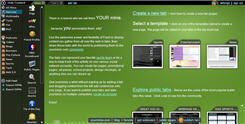 yourminis- Launched, on Nov 6, another Flash application which enables you to create your homepage, with standard widgets including videos from YouTube, photos from Flickr, weather from the Weather Channel and the latest headlines from Digg, and your own gmail account. You can customize the page without creating an account, with all your settings being stored in a browser cookie. Add RSS feeds, download videos, display your content forming tabs and can even share it with everyone else. Easy to navigate and a perfect example of usability integrated with flash.
 Msdewey- A flashed based search engine which initially pulled a lot of traffic and proved to out be a linkbait for Microsoft. It gave a humanly feel to searching on internet but sometimes Msdewey’s rumblings get on nerve if you want to search something fast. Being flash based it is a little slow to load. She will be sad, happy, angry, she may sometimes even sing to you, as a flash application it is real cool but from a search engine’s perspective it is slow, sometimes extremely slow. It does not offer any advanced feature and the results are close to cause your eyes an irritation. It would be a cool site to show your friends but not search on it. They even provided you with a mute button on its homepage, Guess they realized she can be too annoying to people.
 Swarmthe.com- The creator says-“Swarm is a useful tool for browsing the web, not searching it. You need to come here with an open mind and you may find some really cool stuff. Swarm is a graphical map of hundreds of websites, all connecting to each other. It updates itself every second with where people are going and coming from. As sites become more popular, they move towards the center of the swarm.”
You can actually watch who is surfing what, with thin lines representing traffic transfer. A look at ‘The Swarm,’ a Flash-animated mosaic where visitors can view the real-time online travels of Swarmthe.com’s volunteer surfers. Swarm got much publicity after it appeared on Digg and saw around 1000 volunteers per day. It has a database of around 8 million sites. efficiently. It is a good example of social browsing though only the more popular would be covered. As with heavy flash sites, this one takes lot of time to load, and you may come across an occasional error message.
Keep in mind it is the quality of your content and information you provide which gives you repeat visitors and not the animations and flash that is used in the site. Use Flash to boost up your sites design effectively and use it properly. Do not overdo it.
Happy Blogging,
Divya Uttam.
Bookmark this article:-
Technorati Tags:- Flash, Blog Design
With all this going on, it’s always an issue to watch the role Flash plays here. Flash can much obviously make your site attractive and unique. Its quite an entertaining experience for the visitors to surf flashy sites and can make your site more sticky. When we acknowledge flash based utilities we can call it creativity at its best.
Where stickiness comes, unnecessary or overuse of flash may annoy your visitor. The major issues to handle are mass approach, navigation and usability of your idea. As the neThe point to ponder is the loading time of such sites and how effectively Flash is being used.t becomes more multimedia oriented and trendier, it should become more advanced and user-friendly.
How to effectively fuse it with your site? What should Flash Do for you and your User?
1. It should add to the user experience
2. Use Flash to support your content but not the other way round
3. Enhance User Interface
4. Optimize Flash files as much as possible.
5. Should make navigation easier.
6. Use Flash wisely and in reasonable amounts.
When can flash go against your site?
1. Flash should not interfere with the information on your site.
2. Don’t make your whole site a Flash Application. If you do provide with an alternate choice of HTML version.
3. Should not slow down your sites loading time noticeably.
4. Do not use text in flash which you want to be indexed by the search engines.
5. Flash should not be your objective but a help to display content effectively.
6. Accessibility should not be hampered.
Not all browsers support Flash files effectively. If the text is included with the designing part of flash it may not be properly retrieved, hence creating a vacuum in information provided, as it is flash based websites are not able to handle large amount of text. Heavy flash usage can also weigh down your web page.
Why Use Flash?
Flash is the best way to fill content gap and making your site presentable. It is a visually compelling tool that you can use to attract your visitors with. You can use flash creatively to appeal to the theme of your website. If you are running a site where flash is the actual content(like Gaming sites, jokes, maps and graphs) it is as useful.
Lets look at the following case studies:-
 yourminis- Launched, on Nov 6, another Flash application which enables you to create your homepage, with standard widgets including videos from YouTube, photos from Flickr, weather from the Weather Channel and the latest headlines from Digg, and your own gmail account. You can customize the page without creating an account, with all your settings being stored in a browser cookie. Add RSS feeds, download videos, display your content forming tabs and can even share it with everyone else. Easy to navigate and a perfect example of usability integrated with flash.
 Msdewey- A flashed based search engine which initially pulled a lot of traffic and proved to out be a linkbait for Microsoft. It gave a humanly feel to searching on internet but sometimes Msdewey’s rumblings get on nerve if you want to search something fast. Being flash based it is a little slow to load. She will be sad, happy, angry, she may sometimes even sing to you, as a flash application it is real cool but from a search engine’s perspective it is slow, sometimes extremely slow. It does not offer any advanced feature and the results are close to cause your eyes an irritation. It would be a cool site to show your friends but not search on it. They even provided you with a mute button on its homepage, Guess they realized she can be too annoying to people.
 Swarmthe.com- The creator says-“Swarm is a useful tool for browsing the web, not searching it. You need to come here with an open mind and you may find some really cool stuff. Swarm is a graphical map of hundreds of websites, all connecting to each other. It updates itself every second with where people are going and coming from. As sites become more popular, they move towards the center of the swarm.”
You can actually watch who is surfing what, with thin lines representing traffic transfer. A look at ‘The Swarm,’ a Flash-animated mosaic where visitors can view the real-time online travels of Swarmthe.com’s volunteer surfers. Swarm got much publicity after it appeared on Digg and saw around 1000 volunteers per day. It has a database of around 8 million sites. efficiently. It is a good example of social browsing though only the more popular would be covered. As with heavy flash sites, this one takes lot of time to load, and you may come across an occasional error message.
Keep in mind it is the quality of your content and information you provide which gives you repeat visitors and not the animations and flash that is used in the site. Use Flash to boost up your sites design effectively and use it properly. Do not overdo it.
Happy Blogging,
Divya Uttam.
Bookmark this article:-
Technorati Tags:- Flash, Blog Design
Labels: Tech Fame, Web Usability
 Blogging to Fame Feed Options
 Most Discussed Stories
 Latest Entries
 To Readers
 Bookmark this Blog
 Save This Blog with Technorati
 Categories
 Recent Readers
 Archives